

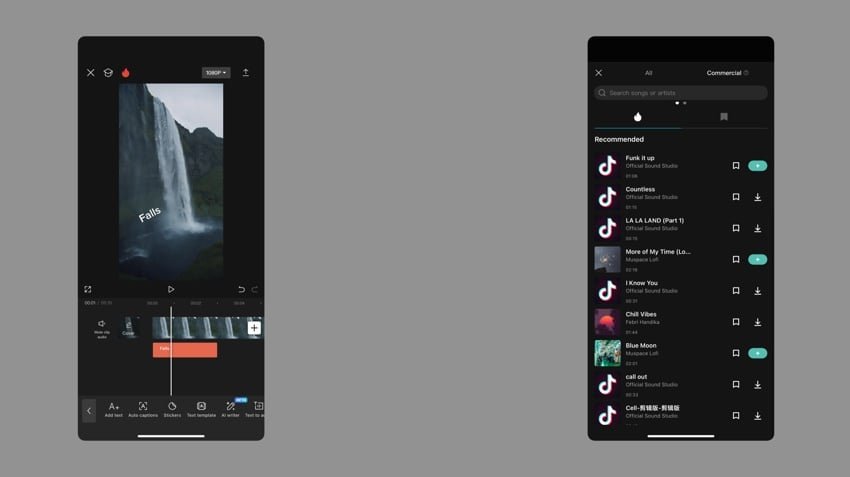
Short-form video content has become a dominant form of engagement on platforms like Instagram, YouTube Shorts, and Facebook Reels. For creators in India’s Tier 1 and Tier 2 cities, producing visually appealing and trending reels can dramatically boost reach and audience interaction. CapCut, a free and user-friendly video editing app, has emerged as a go-to tool for crafting professional-looking reels without expensive equipment or complex software.
Why CapCut Stands Out
CapCut offers a comprehensive set of features tailored for short-form content creators. From intuitive trimming and transitions to advanced effects, creators can produce high-quality videos directly from their smartphones. Its ready-to-use templates, trending audio tracks, and AI-powered tools make it accessible for beginners while still providing flexibility for experienced editors.
Step 1: Plan Your Content
Before opening the app, define the theme of your reel. Popular categories include lifestyle snippets, quick tutorials, food, fashion, or viral challenges. Observing trending reels on Instagram and TikTok India can provide insight into popular formats, music choices, and storytelling techniques. Planning ensures that the final video aligns with audience preferences and platform trends.
Step 2: Using CapCut Templates
CapCut provides pre-designed templates specifically for reels. Select a template that matches your content style, upload your clips or images, and let the app automatically adjust transitions and effects. Templates are especially useful for creators looking to save time while ensuring their content looks polished and engaging.
Step 3: Add Trending Music and Effects
Music is a critical factor in making reels go viral. CapCut allows creators to import trending audio directly or select from its library. Pairing the right music with visual effects and transitions can significantly enhance viewer engagement. Filters, stickers, and motion effects further enhance the storytelling aspect, making content more dynamic and shareable.
Step 4: Fine-Tuning and Exporting
Once the initial edit is complete, review the reel for pacing, clarity, and overall flow. CapCut’s editing tools allow for trimming, color correction, and speed adjustments. When satisfied, export the video in high resolution optimized for social media platforms. Ensure that captions, hashtags, and thumbnails are carefully considered to maximize visibility.
Step 5: Posting and Engagement
After publishing, monitor audience engagement and feedback. Posting at optimal times, using relevant hashtags, and interacting with viewers can improve reach. Indian creators can leverage regional trends, festivals, or cultural events to produce relatable reels that resonate with local audiences, increasing the chance of virality.
Conclusion
CapCut has simplified the process of creating professional-looking reels for creators across India. By planning content, utilizing templates, adding trending music, and fine-tuning edits, creators in Tier 1 and Tier 2 cities can produce reels that attract views and engagement without needing advanced software or equipment. With consistent effort and attention to trends, CapCut can help transform simple clips into viral social media content.












Leave a comment