

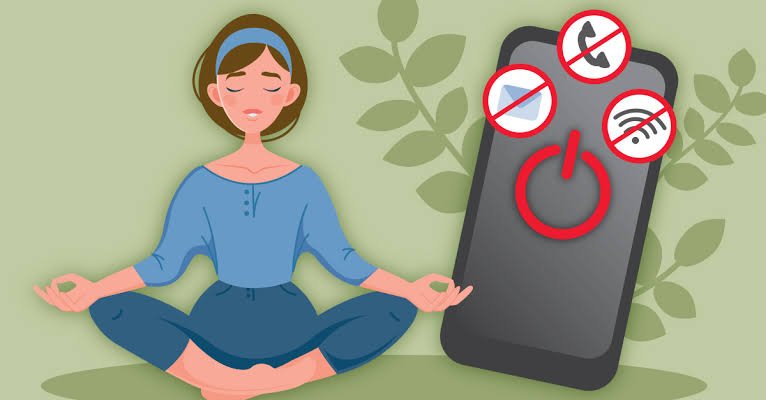
Digital detox for students does not mean giving up smartphones, laptops or the internet completely. It means building healthier digital habits, reducing unnecessary screen time and making room for studying, sleep, exercise and social interaction without losing access to useful technology.
Why Digital Detox Matters for Students
Digital devices have become an essential part of student life. From online classes and digital notes to educational videos, messaging apps and examination preparation, students rely on screens for both learning and communication. However, problems can arise when academic screen time becomes mixed with continuous scrolling, gaming, notifications and late-night entertainment.
A digital detox helps students become more aware of how they use their devices. Instead of treating every screen as a distraction, the aim is to distinguish productive use from habits that consume time without adding much value.
The concern is not simply the number of hours spent online. The purpose of screen use, the time of day, the type of activity and its effect on sleep, concentration and physical activity all matter. A student attending an online lecture for two hours is using technology differently from someone spending the same time switching between short videos and social media feeds.
For students preparing for board examinations, competitive tests or college assessments, managing these habits can help create a more focused study environment.
How Excessive Screen Time Can Affect Students
Excessive recreational screen use can interfere with several parts of a student’s routine. One common problem is distraction. Notifications, incoming messages and the urge to check social media can interrupt study sessions, making it harder to maintain attention on a difficult subject.
Sleep is another important factor. Using devices late at night can delay bedtime, particularly when students continue watching videos or chatting instead of preparing to sleep. The light emitted by screens, along with stimulating content and irregular routines, can also affect sleep timing.
Long periods of sitting with a phone or laptop may reduce time available for outdoor activities, sports and movement. Students may also experience eye strain, headaches, dry eyes or neck discomfort after prolonged device use.
These effects do not occur in the same way for everyone. Screen use alone does not explain every concentration problem or sleep difficulty. Academic pressure, stress, health, family routines and the learning environment also play a role.
The practical goal is to identify whether digital habits are interfering with daily responsibilities and make changes that address the specific problem.
Set Screen Time Limits Without Giving Up Technology
One of the easiest ways to begin a digital detox is to set realistic limits for recreational screen use. Students do not need to stop using their phones altogether. They can begin by reducing the time spent on activities that regularly interrupt their routine.
Most smartphones include built-in screen time tools. Apple’s Screen Time and Google’s Digital Wellbeing features allow users to review app usage and, depending on the device, set app limits, schedules and other restrictions.
Students can start by checking which applications consume the most time over a typical week. If short-video apps account for an hour or more each day, setting a modest limit may be more practical than attempting to eliminate them immediately.
For example, a student who usually spends 90 minutes scrolling after school could aim to reduce that time gradually, perhaps by 15 to 20 minutes at first. The saved time could be used for revision, exercise, reading or simply resting without a screen.
These limits work best when they are treated as useful boundaries rather than punishments. If an app is required for assignments or communication, students should make sure that restrictions do not block essential academic tasks.
Create a Distraction-Free Study Routine
A digital detox becomes easier when students change how they study rather than relying only on willpower.
One approach is to keep the phone away from the immediate study area during focused work. If a laptop is necessary for online learning, students can close unrelated tabs, silence non-essential notifications and keep entertainment apps out of view.
The Pomodoro technique is another option. Students work on a task for a defined period, such as 25 minutes, and then take a short break. The exact duration can be adjusted according to the subject, attention span and workload.
During breaks, it helps to stand up, stretch, drink water or walk around rather than automatically opening social media. Otherwise, a five-minute break can easily become a much longer interruption.
Students should also distinguish between necessary and unnecessary notifications. Messages from teachers, school platforms or family members may need to remain accessible, while promotional alerts and social media notifications can often be disabled.
A consistent routine reduces the number of decisions students need to make throughout the day. Instead of repeatedly deciding whether to check their phones, they have a clear plan for when devices are useful and when they should be put aside.
Protect Sleep by Changing Night-Time Phone Habits
Late-night phone use is a common challenge for students, particularly those who use messaging apps, online games and streaming platforms to relax after studying.
A practical first step is to establish a regular bedtime and create a period of reduced screen use before sleeping. Students can begin with 15 to 30 minutes without recreational screen activity and extend the period if it helps them settle down.
Keeping the phone away from the bed can reduce the temptation to check notifications repeatedly. If a device is needed as an alarm, students can use its alarm function while placing it at a distance that makes casual scrolling less convenient.
Night mode and reduced brightness may improve visual comfort, but they do not remove the effects of stimulating content or lost sleep time. Students should not treat these settings as a replacement for healthy sleep habits.
For school and college students, a consistent sleep schedule is generally more useful than staying awake late to finish unnecessary online activities. Younger students typically need more sleep than adults, so sleep requirements should be appropriate to their age.
Replace Mindless Scrolling With Offline Activities
Reducing screen time is easier when students have attractive alternatives. Simply removing an app without changing the habit that surrounds it can lead to boredom and a return to the same behaviour.
Physical activities are a useful starting point. Walking, cycling, playing cricket, badminton or participating in another sport can provide a break from screens while encouraging movement and social interaction.
Students can also explore reading printed books, drawing, music, cooking, journaling or other hobbies that do not require a connected device. Spending time with friends and family without everyone looking at their phones can improve the quality of social interaction.
These activities do not need to be expensive or time-consuming. A 20-minute walk, a short conversation with a friend or a few pages of a book can help break the habit of reaching for a phone whenever there is a spare moment.
The objective is not to fill every free minute with another task. Rest and unstructured time matter too. Students should have opportunities to relax without feeling that they must remain productive throughout the day.
Use Social Media More Intentionally
Social media is not automatically harmful. Students may use it to maintain friendships, discover educational resources, follow current affairs or share creative work. The difficulty arises when usage becomes automatic or starts interfering with responsibilities.
Students can make social media more intentional by deciding why they are opening an app before using it. If the purpose is to reply to a message, they can complete that task and leave instead of continuing to scroll without a clear reason.
Unfollowing accounts that create unnecessary pressure, muting distracting notifications and removing rarely used applications from the home screen can also reduce habitual checking.
Another useful method is to schedule specific periods for recreational browsing. For instance, a student might check social media after completing an assignment rather than keeping it open throughout a study session.
Comparisons with influencers and peers can also affect how young people feel about their appearance, achievements and lifestyles. Students should remember that online posts often present selected moments rather than a complete picture of someone’s life.
A healthier digital routine allows students to enjoy useful online content while protecting time for their own priorities.
A Simple Seven-Day Digital Detox Plan for Students
Students who want to change their habits can begin with a short, manageable plan instead of attempting a complete digital shutdown.
Day 1: Review your usage. Check your phone’s screen time report and identify the apps that take up the most recreational time.
Day 2: Turn off unnecessary notifications. Keep essential academic and family alerts available while disabling interruptions from non-essential apps.
Day 3: Introduce focused study periods. Put your phone aside during one or two study sessions and use scheduled breaks.
Day 4: Reduce late-night scrolling. Set a time to stop recreational browsing before bed.
Day 5: Add an offline activity. Spend at least 20 to 30 minutes walking, playing a sport, reading or pursuing a hobby.
Day 6: Create a phone-free period. Keep devices away during a meal, family conversation or another suitable part of the day.
Day 7: Review your progress. Compare your habits with the first day. Identify which changes were helpful and set realistic goals for the following week.
This plan is a starting point, not a strict medical programme. Students can adapt it around examinations, online classes and other responsibilities. The purpose is to develop sustainable habits rather than achieve a perfect screen time score.
Key Takeaways
- A digital detox means managing screen use more thoughtfully, not abandoning technology completely.
- Built-in screen time tools, notification controls and focused study sessions can reduce unnecessary digital distractions.
- Protecting sleep, taking movement breaks and building offline hobbies can support a healthier daily routine.
- Small, consistent changes are generally more sustainable than strict rules that are difficult to maintain.
Frequently Asked Questions
1. What is a digital detox for students?
A digital detox is a planned effort to reduce unnecessary digital use and develop healthier relationships with phones, computers, social media and other connected devices. It can include screen-free breaks, app limits and changes to study or bedtime routines.
2. How much screen time is acceptable for students?
There is no single screen time limit that is appropriate for every student across all ages and activities. Educational use, recreational use, sleep, physical activity and individual needs should be considered together. Parents can follow age-appropriate guidance from health professionals and focus on whether screen habits interfere with daily life.
3. How can students reduce screen time during examinations?
Students can silence non-essential notifications, keep phones away during focused study periods, block distracting websites when appropriate and schedule short breaks. Keeping educational resources accessible while restricting recreational distractions can help students prepare without disconnecting completely.
4. Can students use social media while following a digital detox?
Yes. A digital detox does not require students to delete every social media account. They can set reasonable usage limits, choose specific times to browse, mute unnecessary notifications and prioritise educational, social or creative uses over automatic scrolling.









Leave a comment